Diagnosing & Fixing Errors on the TI-84 Plus CE
The TI-84 Plus CE is a powerful calculator, but like any programmable device, it may display error messages if something goes wrong. Whether you’re evaluating an expression, plotting a graph, or executing a command, this guide will help you understand, diagnose, and fix common errors easily.
When Do Errors Occur?
The calculator may display an error message while performing:
- Evaluating an expression
- Running a command or program
- Graphing a function
- Storing a value in a variable or list
Diagnosing an Error
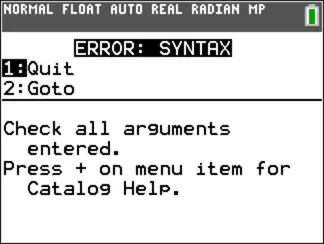
When an error occurs, the TI-84 Plus CE shows a clear error message with a brief description.
You will typically see these two options:
| Option | Action |
| 1: Quit | Exits the error message and returns to the home screen |
| 2: Goto | Opens the screen where the error occurred, placing the cursor at or near the error |
Note:
If the error comes from a Y= function (e.g. during graphing), pressing Goto will take you to the Y= editor, not to the program that called it.
How to Fix an Error (Step-by-Step)
Follow this process whenever you get an error on your TI-84 Plus CE:
Step 1: Note the Error Type
Check the message at the top of the screen. Examples:
- ERROR:SYNTAX
- ERROR:DIM MISMATCH
- ERROR:DOMAIN
Step 2: Press 2:Goto (if available)
This moves the cursor to where the error occurred — so you can fix it directly.
Step 3: Analyze the Error Context
- The calculator might offer a brief hint (e.g., “Check function format”).
- Use your knowledge of syntax, parentheses, variables, and graphing setup.
Step 4: Correct the Expression
Make the necessary changes — this might involve:
- Fixing a missing parenthesis
- Correcting variable names
- Adjusting dimensions of lists or matrices
Step 5: Re-run the operation
Press enter to try again.
Pro Tips for Avoiding Errors
| Tip # | Why It Helps |
| Double-check parentheses | Unmatched brackets cause common syntax errors |
| Use clear on Y= screen | Hidden plots or old expressions can interfere with graphs |
| Reset RAM carefully | If things get messy, reset but be cautious (you’ll lose data) |
| Enable error help in MODE | Use Stat Wizards: ON for syntax help in stats functions |
Common Error Types and What They Mean
| Error Type | Description |
| SYNTAX | Mistyped function or missing operator/parenthesis |
| DOMAIN | Value entered is not allowed (e.g. sqrt of a negative) |
| DIM MISMATCH | Lists or matrices have different lengths or sizes |
| INVALID DIM | Using an operation with incompatible list or matrix sizes |
| WINDOW RANGE | Graphing window is invalid (e.g., min > max) |
| ARCHIVED | You’re trying to use a variable stored in archive memory |